Licence
Install the licence, read its state and the banner, the reminder mails, the usage report for the renewal, and air-gapped installs.
Since 1.1, every Harthelm installation runs under a licence: a small signed file that says who may run it, for how long and within which limits. You get it when you buy Harthelm, or as a time-limited trial licence for an evaluation. Harthelm checks it offline with keys built into the release: nothing is sent anywhere and nothing is activated online.
A licence never stops anything that runs. Without a valid one, an installation is restricted: it keeps everything that exists running and pauses new teams, organizations, workspaces, managed services, domains, invitations and users.
Install the licence
There are three ways. Pick one; while the Helm values name a Secret, the Secret is the only source.
Put the licence file into a Secret in the release namespace and name it in the values. This is the way for GitOps and for a first install, because the chart's preflight checks the licence before anything starts.
kubectl -n harthelm-system create secret generic harthelm-license --from-file=license=company.licenselicense:
existingSecret: harthelm-license
# secretKey: license # the key in the Secret, this is the defaultThen helm upgrade (or helm install) with these values. To renew, replace the file in the Secret; core reads it
again within a minute, so no restart is needed. While
license.existingSecret is set, the console
and hart show the licence read-only.
The chart's preflight checks a licence named by the values with the keys of the release it installs: a missing Secret or key, or a licence this release does not accept, fails the install or upgrade with the reason in the preflight log. A licence that has ended or is in its grace period only gives a note there, so its dates never block an upgrade.
A renewal can be installed any time before the old licence ends: a licence whose term starts later shows as Starts later and takes over on its start date. A replacement with the same term (more vCPUs, for example) takes over at once, and the old one shows as Replaced.
The installation id before the first sign-in
A licence bound to an installation names its id, and the id exists only once core has started on the platform database.
On a fresh installation nobody can read it in the console yet: the installation is restricted, which refuses the first
sign-in of every new user except the break-glass administrator. So since 1.5 core says it in its log at every start
without a licence in force, at INFO:
no licence installed; installation id 0b9e4c6a-3f1d-4a8e-9c2b-7d5e1f0a6b3c; see docs/license.mdThe chart's notes print the command that finds it while license.existingSecret is not set, after helm install and
helm upgrade and again with helm status harthelm (Argo CD shows no chart notes):
kubectl -n harthelm-system logs deploy/harthelm-core -c core | grep "no licence installed""Without a licence in force" means that no licence verifies, is bound to this installation and has started: a fresh
installation, an installation in the upgrade grace of 1.1, or one whose only licences are invalid, revoked or meant for
another installation. A licence that ended is still the licence in force, so no id line follows it. The doctor's
license check names the id in its detail in the same cases, and hart admin license shows it as Installation: to a
signed-in cluster admin. Then the licence goes into the Secret that
license.existingSecret names, or the break-glass administrator installs it with hart admin license install. The
whole order is in Install with Helm.
See the licence
Platform → Licence shows who the installation is licensed to, the term and grace period, the limits against what they count now and their highest daily value of the last 90 days, and every licence installed so far.
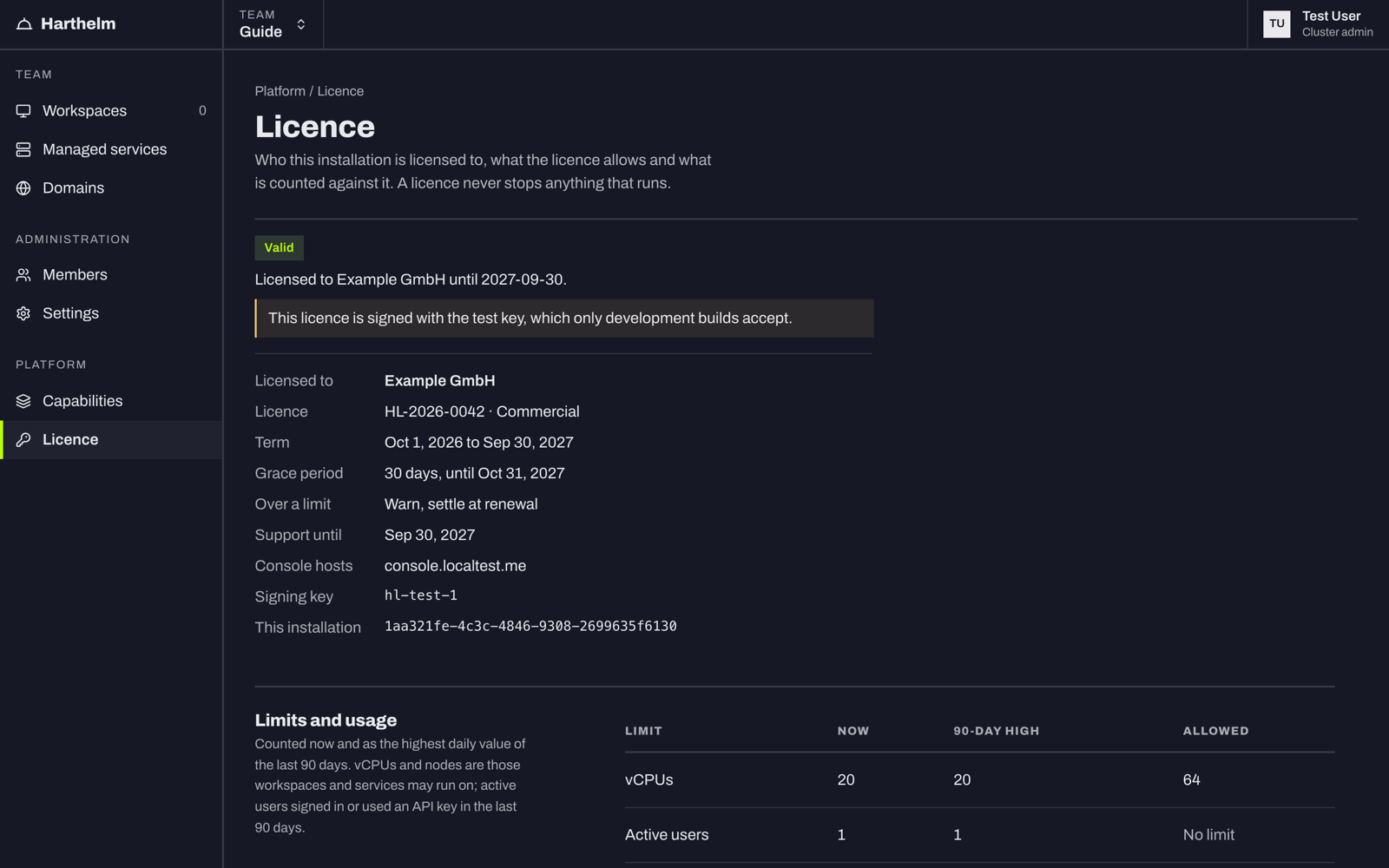
The same from the command line, with exit status 1 while the installation is restricted:
hart admin licenseThe doctor's last check, license, is ok while the licence is valid and warns while it ends soon, in its grace period,
over a limit, or for another console host than the licence names. It fails while the installation is restricted.
What the limits count
A licence limits some of these; one it leaves out is not limited.
| Limit | Counted as |
|---|---|
| vCPUs | The allocatable vCPUs of the nodes workspaces and services may run on (the nodes scheduling.workspaces selects, or every node that takes workloads when it selects none). Nodes that are cordoned or switched off at night count too: the licence measures capacity, not use. |
| Active users | People who are not disabled and signed in or used an API key in the last 90 days. The break-glass administrator does not count. |
| Workspaces | Workspaces that are not deleted. |
| Nodes | The nodes counted for vCPUs. |
Going over a limit only warns, and is settled at the renewal. A licence can say otherwise: then new users or workspaces beyond the limit are refused.
States and the banner
| State | When | Who sees what | Paused |
|---|---|---|---|
| Valid | More than 60 days left | nothing | nothing |
| Ends soon | 60 days or less left | cluster admins: a banner with the days left | nothing |
| Grace period | After the last day, for 30 days (a trial: 7) | cluster admins: a warning banner; everyone else: "This installation's licence needs renewal." | nothing |
| Restricted | After the grace period, or without a valid licence | everyone: a red banner | new teams, organizations, workspaces, managed services, domains, invitations and the first sign-in of new users |
What never stops, in any state: running services and IDEs with their volumes, domains and certificates; sleep and wake; Sync and Run of existing workspaces; backups and restores; sign-in of existing users; the API for reading and exporting; every admin page, and installing a licence. Nothing is deleted or scaled down because of the licence.
A refused request answers 403 with the problem type license-restricted (or license-limit for a limit the licence
enforces), and a sentence that names the reason. See Problem types.
Reminder mails
Besides the banner, Harthelm mails every cluster admin 60, 30, 14, 7 and 1 days before the licence ends, once
when its grace period starts and once when the installation turns restricted. Each mail says the end date, what
happens next and how to install the renewal: on the Licence page, with hart admin license install, or in the Secret
when the Helm values manage the licence.
- The mails need mail to be set up, and go to cluster admins who have an email address and are not disabled. The break-glass administrator gets none.
- Each reminder goes out once, within the hour after its moment. A core that was down over several moments sends only the latest; nothing is sent while mail is off, and the reminder that is due goes out once mail works.
- Once a renewal is installed, the reminders stop.
For your own alerting, the metrics harthelm_license_state, harthelm_license_expiry_timestamp_seconds,
harthelm_license_usage and harthelm_license_limit are better than the mails; see
Metrics.
The usage report for the renewal
At renewal, your vendor asks for the usage report: the highest daily value of each counted limit since the licence started. It holds counts only, no names or email addresses, and the installation never sends it anywhere: you hand it over.
Platform → Licence → Download usage report.
Air-gapped installations
Nothing changes: the licence is checked offline with the keys in the release, so an
air-gapped install uses the same Secret, console page or hart command. Copy the
licence file in like any other file.
Upgrading from 1.0
Licences came with 1.1. An installation upgraded from 1.0 without a licence runs 30 days in its grace period from
the first start of 1.1: nothing is paused, cluster admins see the grace banner and get the grace mail, and the doctor's
license check says how to install one. Install the licence within those 30 days, before or after the upgrade. A
fresh install has no such grace: install the licence with it. See Upgrades.